Tuesday, July 12, 2011

Disaster Recovery Planning

1- Get Started:- It is important to be prepared as you will need to cost justify by presenting some number that identifies the cost of downtime and how much company revenue is at risk if business systems become unavailable for an extended period.

2-Why need a plan- for asset protection, and the rapid recovery and restortaion of business critical systems.

3-Defining the right plan-understanding what keeps the business running and prioritising the recovey of different systems.

4-Spot the mistakes-insufficient time spent identifying,planning or preparing for the design,implementation and exercising the system."Every time a system update or change control process is sinitiated,the business continuity plan should be retested to see if it has been impacted and still functions as designed."

5-Learn from real life-What happens when the UPS doesn't kick in?"Even though you have a backup plan you don't necessarily have a backup!"

6-Understand your business-don't skip the initial business impact analysis: not all servers have equal priority.think Communications, messaging and customer-facing systems.

7-Know the cost of downtime-it will help you sell the need for network and infrastruture improvements to executives.

8-Getting data out of the building- whether you outsource or invest in a secondary datacentre."You have to plan for the worst case scenario,and if you don't you are doing your company a disservice and putting it at risk.

9-Think beyond tape-Many companies are replacing tape backup solutions with disk-to-disk backup solutions because the data is readily available and it greatly reduces the recovery time typically associated with tapes.

10-Consider enhancing business continuity with virtualization-"The biggest excuse for not testing is the usual downtime required of the production systems in order to test the failover and recovery process."Virtual machines allow you to test virtual infrastructure as if it is part of your disaster recovery centre.

Source:- Internet

Thursday, June 16, 2011

MSXML 6.0 Parser failed to install

MSXML6 (msxlm6.msi) install fails giving following error
“the system administrator has set policies to prevent this installation …”

Resolution :

Open regedit.exe from
1.“Start->Run”

2. Find the path via “HKEY_CLASSES_ROOT -> Installer -> Products”

3. Delete all the subkeys if they don’t contain anything (there is no “+” before their folder icons ) under “Products”.

4. Re-run msxml6.msi it works successfully.


Source: Internet

Monday, January 10, 2011

Common Ways of Malicious Code

Introduction


As of 2010, there are nearly three million unique forms of known malicious code, and thousands of new ones are discovered daily. The risk of being infected is greater than ever. The damage caused by an infection can range from a minor annoyance to a catastrophic disaster. The old wisdom continues to ring true: an ounce of prevention is worth a pound of cure.

Most computer users are aware of the importance of security to reduce the threats that could potentially harm a computer or network. For example, anti-virus and anti-spyware are essential defenses in the war against malicious code. However, technology cannot compensate for poor and risky behavior. Thus, proper training and understanding, along with behavior changes, are needed to facilitate a reduction of malicious code infections.

10 Common ways malicious code can reach our private network that we need to be aware of:

1.EMAIL ATTACHMENTS:

Attachments to e-mails are a common method of distribution of malicious code. E-mail is inherently insecure due to its use of SMTP, a plain text-forwarding protocol, and its lack of strong authentication of message senders.The source of an e-mail address can be easily spoofed or falsified as someone that you trust. Often, this alone is enough to trick a recipient into opening an attachment.Generally, avoid using attachments as a means to exchange files. Instead, use a third-party file exchange system (such as DropBox, Box.net, Drop.io, MediaFire, Windows Live SkyDrive, Foldershare, RapidShare, MegaUpload,Dropload, YouSendIt, SendThisFile, etc.). Thus, when an attachment does arrive, it is suspicious for being abnormaland not the standard method by which common communications take place.If you receive an attachment and need to determine if it is legitimate, you still need to verify it before opening it. Create a new e-mail (do not reply to the message with the attachment) to the sender and ask for confirmation that they sent the file. Maybe even ask the filename, size, and hash value if you are really concerned. Or, call the person and ask if they sent you an attachment on purpose. If the sender does not confirm the attachment,DELETE it.

2.PORTABLE MEDIA:

Portable media includes any device that can store information. This includes optical discs (CD, DVD, HD-DVD,Blu-Ray, etc.), tapes, external hard drives, USB drives, and memory cards. Any storage device can support both benign and malicious content. The less you know about or trust the source of a device, the more you should be cautious about accepting the device and connecting it to your system. Any media from outside the organization should be highly scrutinized, especially if obtained from a questionable or unknown source.

A possible defense is to use a dedicated scanning system. Every new-to-you media can be scanned at this standalone system before it is used on any production system. Assuming the stand-alone scanner system is updated regularly, it will greatly reduce the risk of malware distribution via media. Another option would be to limit data exchanges to file sharing services that do not involve portable media.

3.VISITING MALICIOUS WEB SITES:

The Web browser is the primary tool used to interact with the Internet, which is a dangerous place. Thus, many threats breach our organizations’ defenses through this seemingly innocent client software. Popular and wellknown sites are generally not a significant threat; however, any site can be the victim of an attack, which in turn could leave you at risk.

Following hyperlinks sent to you by e-mail or chat could lead to malicious locations. Additionally, some search results might not lead to legitimate locations. Always be cautious about following Web links to domain names you don’t generally recognize.

It is difficult to always be aware of the reputation of a Web site are visiting, but you can reduce the risk by using an updated browser, limiting auto-execute features of mobile code, and running anti-malware scanners.

4.DOWNLOADING FILES FROM WEB SITES:

Even when visiting generally trustworthy Web sites, there may be additional risk if you elect to download content to your local system. Take ever greater caution when choosing to download material from any site. Seek out only those locations that are known to be safe and trustworthy. For example, download.com, managed by CNet,is a safe location to download software, because they test and verify every file available through their service.


5.PARTICIPATION IN P2P FILE SHARING SERVICES:

Concern over downloaded, malicious content grows when that code isobtained through a peer file-sharing system.This is not a condemnation of efficient, distributed transmission solutions, but rather the sources of the files exchanged through them. By not knowing or having control over the source of a file, it is possible that malicious code could be included along with the content being sought.

6.INSTANT MESSAGING CLIENTS:

One increasingly popular communication medium is that of IM or instant messaging. Through chat systems,especially those using installed software clients instead of Web interfaces, the exchange of files is possible. There
have been security breaches that allowed remote hackers to upload and/or download files through holes in IM client software. Even with a patched client, it is possible for a user to accept an offered file from an unknown
source or follow an offered hyperlink to a malicious Web site.

7.NEW DEVICES & PERIPHERALS:

A risk that is often overlooked due to its rarity is malware found on brand new devices, right out of their packaging.Mobile phones, digital photo frames, and even media players have been compromised during manufacturing,resulting in malware that makes its way to a customer’s computer. This has happened with a well-known,commercial, shrink-wrapped, anti-virus product.
Vendors often outsource the actual construction and pre-production of their products to external manufacturers and assemblers. When computer parts are the product being constructed, especially those with storage
capabilities, malware can make its way onto the new device while it is loaded with its software elements if the manufacturer’s system is infected. One way to reduce this threat is to not be an early adopter of a product nor the first to grab an updated version of an existing product. Give the rest of the market a few days or weeks to discover malware and other concerns before adding the new device or peripheral to your repertoire.

8.SOCIAL NETWORKING SITES:

Social networking sites offer up several situations that could allow malware to make its way onto your network.First, there are the social engineering attacks that trick users into accepting fraudulent information that, when acted upon, could compromise an account or the security of a computer. Second, with the proliferation of message posting and exchange services, it is easy to follow hyperlinks to malicious Web sites. Third, some in-site applications, written by malicious entities, attempt to hijack accounts or distribute malicious code.

9.SOCIAL ENGINEERING ATTACKS:

Social engineering is the art of convincing someone to either give up information or perform a task that results in the reduction of security. Large organizations are the most common targets of social engineering attacks;however, mass e-mail-based attacks could show up in anyone’s inbox.

Be aware that attackers are trying to trick you into following hyperlinks, downloading files, performing configuration changes, or typing in esoteric commands. Doing so could lead to the direct infection of your system with
malware.

10.NOT FOLLOWING SECURITY GUIDELINES & POLICIES:

The last and probably most significant cause of how or why malicious code reaches our private network, or even just your personal computer system, is by not following proper security guidelines and policies. Most organizations of moderate size have made the effort to design a secure infrastructure. This includes prescribing user access policies and providing at least some level of security awareness training.

Failing to abide by security guidelines or purposefully violating security policies will lead to compromised security, often the distribution of malicious code. Security policies are written and implemented for a reason –to reduce the likelihood of a security breach. If a worker fails to abide by the company security policy, they put themselves and the entire organization at risk.

Bypassing filters, using storage devices from outside resources, using unauthorized peripherals, blocking software updates, opening e-mail attachments, participating in unethical file exchanges, and using non-approved software clients are all security policy violations and increase the chance of malicious code infesting the organization.

Every organization and every individual has a vested interest in operating with common sense security guidelines.This will assist in reducing the risk of malicious code infection and allow the organization to be productive in accomplishing missions, goals, or sales, without having to spend resources on recovery.

As an IT respresentative task to do:
1.Write security policy.
2.Define the acceptable use policy.
3.Train users on how to perform their jobs within the confines of security.
4.Use automated tools to detect and defend.
5.Monitor the environment for abuse, misuse and compromise.


Source: Internet & Myself.

Thursday, August 26, 2010

IT Skills Development

Top 10 Essential IT Skills:

Honestly IT profession has changed more in the last few years than ever before. Some of these changes have been advances in technology, while others have been spurred by government regulations.


Whatever the reason, IT is almost unrecognizable from what it was even five years ago. So how is an IT professional supposed to keep up with all these changes? It isn’t easy, but there are certain skills you should be focusing on to ensure you don’t get left behind. Here’s a look at the top 10 essential IT skills for today.
I hopes this will not make you bore , but gain some knowledge FOR SURE!

1. Windows PowerShell


A thorough understanding of Windows PowerShell is essential because it’s starting to show up in more and more Microsoft products. For example, in both Exchange Server 2007 and Exchange Server 2010, the GUI-based management tool is built on top of Windows PowerShell. This means that any administrative action you can do from the GUI, you can also do from the command line or through a Windows PowerShell script.The simple fact that you can use Windows PowerShell to administer various Microsoft server products isn’t enough to qualify Windows PowerShell as an essential skill set. The real reason learning Windows PowerShell is essential is because the GUI-based management in many of the newer Microsoft server products is only sufficient for performing basic administrative functions. Anything beyond the basics, you’ll need to do from the command line. As such, it’s increasingly difficult to be an effective administrator unless you understand and know how to effectively use Windows PowerShell. Guys start learning Windows Powershell , by this way we will explore ourself to learn and love Lnux, Unix or any OS whose base is built on lots of command shells.
 
2. Server Virtualization


There’s practically no denying that almost every organization uses server virtualization to a certain degree. Therefore, understanding how server virtualization works is an essential skill for any network administrator.
There are quite a few different server virtualization products on the market. You don’t need to learn the ins and outs of every single one, but it’s important to achieve competency with at least two different server virtualization platforms. Learning at least two platforms will help you understand how server virtualization really works and get a good feel for the standard features and functions of the various virtualization products.
Server virtualization is a science in and of itself. There are IT professionals whose entire careers are based on server virtualization. While it’s unrealistic to expect a general network administrator to have a comprehensive understanding of server virtualization, it’s a good idea to understand resource allocation, how to virtualize a physical server, and how to manage and maintain your virtual servers.

3. Failover Clustering


Failover clustering has been around for years in one form or another. Even so, it has only recently evolved into an essential technology. While it obviously adds fault tolerance to network servers, there are a couple of additional factors that suggest failover clustering has become essential.

First, most major organizations impose Service Level Agreements (SLAs) on their IT departments. The only way IT can realistically expect to adhere to those SLAs is by putting redundant solutions in place and this is what i totally agree and believe.

Another reason failover clustering has become essential is the rampant use of server virtualization. In the old days, if a server were to fail, the outage probably wouldn’t amount to much more than a nuisance. These days, because most organizations use server virtualization technology, the failure of a single server could cause the failure of many virtual servers. As such, server failures are far more critical than ever before, so it’s important to take steps to prevent them.The decline in server hardware prices is one last reason failover clustering has become an essential skill. For a long time, clustering solutions were cost-prohibitive. Today, server hardware is relatively inexpensive, so there’s no reason not to cluster your servers.


4. SAN Management


Another critical IT skill is storage area network (SAN) management. It was debatable whether to include SAN storage on a list of essential IT skills. After all, SANs are expensive and learning about SAN storage may not be essential for administrators in smaller organizations who will most likely never have to even touch a SAN.While this is a valid point, it has started to become far less common for servers to use direct-attached storage. Instead, multiple servers often connect to a single storage pool. This is especially true for organizations that rely heavily on server virtualization.All of the virtualization hosts in my organization store the virtual hard drive files associated with virtual servers residing on those machines on a centralized storage array. Even though I don’t use a SAN, many of the storage management techniques I do use are similar to the techniques used in larger environments that make use of SANs.Another reason to include SAN storage on the list is because cloud-based storage was a major topic at Tech•Ed this year. Almost all of the cloud storage providers are operating SANs. If you subscribe to cloud-based storage, you may end up having to know some basic storage management techniques.

5. Compliance


Many IT professionals hate dealing with compliance issues. For many years, some could avoid having to deal with regulatory compliance by simply avoiding companies within certain industries. Today, that strategy no longer works.One reason the strategy doesn’t work anymore is because jobs have become so scarce. IT professionals who previously avoided working in heavily regulated industries may suddenly find themselves having to work in such an environment. If this happens, then it’s essential you have at least some background in IT compliance.{Compliance is either a state of being in accordance with established guidelines, specifications, or legislation or the process of becoming so}.Another reason why it’s become more difficult to avoid dealing with compliance issues is the predominance of more laws. Just a few days ago, for example, a huge financial reform bill was passed. It remains to be seen how all of the new regulatory requirements will impact IT professionals. Even if you don’t work in the financial services industry, however, there’s no denying that IT professionals are having to deal with more and more regulatory issues from one year to the next.

6. Recovery Techniques


Probably the strangest-sounding skill on this list is recovery techniques. However, there’s actually a good reason why recovery techniques are an essential IT skill. Disaster recovery used to be a lot simpler than it is now. A few years back for instance, disaster recovery might have involved inserting a tape, selecting the files that needed to be recovered, and clicking Go.

Today, things aren’t quite so simple. Almost every Microsoft server product has its own unique disaster recovery requirements. For example, you wouldn’t use the same techniques to back up and restore Exchange Server as you would use to back up and restore SharePoint. Server products such as Exchange, SharePoint and SQL Server all have very complex rules governing the way information must be backed up and restored in order to be successful. Furthermore, these criteria can change dramatically if the server that’s being backed up or restored is a part of a failover cluster or a distributed deployment.

Realistically, most IT professionals probably aren’t going to be intimately familiar with all of the intricate requirements associated with backing up and recovering various server products. Even so, it’s important to understand that such products have unique requirements. It’s equally important for IT pros to familiarize themselves with those requirements.

7. Traffic Management


For a long time, traffic management meant setting up firewalls to forward certain types of traffic to specific servers, while blocking other types of traffic. Those types of configurations are still important, but traffic management is going to take on a different meaning and become much more critical in the not-too-distant future.Eventually, most applications will likely run in the cloud. That means not many applications will be installed locally. As that scenario develops, organizations will find Internet bandwidth has become a scarce commodity. They’ll have little choice but to begin various bandwidth-throttling techniques. Realistically though, you can throttle different applications in different ways. After all, some applications are more critical or of a higher priority than others. The need for prioritizing cloud-based applications will require IT pros to learn all about traffic shaping.

8. IPv6


Another essential skill IT professionals will need to learn is IPv6. Microsoft tried to push IPv6 when Windows 2000 was released more than 10 years ago, but there’s a good reason why it didn’t turn into a mainstream technology a decade ago.

Back then, the dot-com boom was in full swing and people were attaching to the Internet in record numbers. This resulted in a critical shortage of IP addresses. Many believed this shortage could only be solved by transitioning to IPv6, but the problem was ultimately solved by Network Address Translation (NAT)-based firewalls.

NAT firewalls are still widely used today, but it seems NAT was a Band-Aid solution for a problem that will rear its ugly head once again in the near future. NAT works great as long as the computers behind the firewall don’t need access to the outside world. More often, however, people expect universal connectivity regardless of a computer’s location.

IPv6 solves the IP address shortage, and gives every computer a publicly accessible IP address. Furthermore, IPv6 includes security mechanisms that don’t exist in IPv4 without the aid of supplementary protocols such as IPSec. Its a wide topic to discuss, soon will blog seperate post on it.

9. Conferencing


Given the state of the economy, more organizations have begun foregoing travel in favor of online meetings. These online meetings take many different forms. It may be nothing more than a voice over IP (VoIP) conference call, or it may involve a video conference, or even a full-blown collaborative session. In any case, administrators are often surprised to learn that if they want to implement conferencing servers in-house, they have to learn about things that only telephony professionals previously cared about. Latest IT topic i.e.{Exchange Server and Office Communications Server} are into a full-blown collaborative conferencing solution.
10. Mobile Computing


The last essential skill is mobile computing. Even though mobile computing has been around in one form or another for at least 15 years, it has only been recently that people are really starting to take it seriously. Many mobile devices have come and gone. Ultimately, most have never really caught on with the masses. There are always factors holding back widespread adoption.Some of the devices were too expensive. Others were overly complicated. Some devices simply did not have the computing power or the applications required for them to be truly useful. Expensive data rate plans also have contributed to the demise of many a device.
But today, almost everyone has a smartphone of some sort. Modern smartphones are inexpensive, well-connected and capable of running a wide variety of applications. As such, mobile-device connectivity to corporate networks has become a major issue. It’s important for IT professionals to understand the security implications associated with mobile-device use, as well as the safeguards required when allowing employees to use mobile devices.{Recently most popular Smartphone Blackberry -RIM is under serious talks with  security agenices of different countries on encrypted data security.}


Source:Internet

Friday, August 6, 2010

Windows Server tools

1: System Center:Capacity PlannerIt might seem strange to start out by talking about a tool that Microsoft has discontinued. But I’ve found System Center Capacity Planner to be so helpful, I wanted to mention it anyway. In case you are not familiar with this tool, it’s designed to help make sure your proposed server deployment will be able to handle the anticipated workload.According to Microsoft, the System Center Capacity Planner is being replaced by the System Center Configuration Manager Designer (which I have not yet had a chance to use). The end of life announcement for System Center Capacity Planner indicates that it is no longer available, but at the time of this writing, you can still download it from TechNet, as well as from other third-party sites.

2: PowerShell:Microsoft’s Server products have evolved to the point that you can perform almost any administrative action from the command line by using PowerShell. Most of the newer Microsoft Server products include management tools that are actually built on top of PowerShell. This means that any management tasks that can be performed through the GUI can also be performed from the command line or performed through a PowerShell Script. You can download PowerShell 2.0 from Microsoft.


3: Best Practices Analyzer:The Best Practices Analyzer isn’t really a single tool, but rather a series of tools designed to analyze your server deployments and ensure that they adhere to Microsoft’s recommended best practices. Microsoft provides versions of the Best Practices analyzer for Exchange, SQL, Small Business Server, and other Microsoft server products.
4: Security Configuration Wizard:The Security Configuration Wizard  is designed to help you to reduce the attack surface of your servers. It analyzes the way in which your servers are configured and then recommends how you can change various aspects of the configuration to make them more secure. The Security Configuration Wizard is included with Windows Server 2008 and Windows Server 2008 R2, but you can also download a Windows Server 2003 version.


5: ADSI Edit :Another of my favorite tools is ADSI Edit. ADSI Edit allows you to manually edit the Active Directory database. Whenever someone asks me about ADSI Edit, I usually compare it to the registry editor. The registry editor allows you to manually change various configuration parameters within a system, but if you use it incorrectly, you can destroy Windows. ADSI Edit is similar: It gives you free rein over Active Directory, but if you make a mistake, you can destroy it.I have found ADSI Edit most useful for working with Exchange Server deployments. It is sometimes impossible to remove Exchange public folders through conventional means. When this happens, you can use ADSI Edit to get rid of the folders that the Exchange Server management tools leave behind.


6: DCDIAG:Although domain controllers are usually fairly reliable, problems do occasionally occur — particularly with regard to Active Directory replication. The DCDIAG utility, which is included with Windows Server, lets you run a full series of diagnostic tests against malfunctioning domain controllers.


7: Microsoft File Server Migration Wizard:As time goes on, server hardware continues to improve. Some organizations are finding that they can decrease management costs by consolidating their aging file servers. The Microsoft File Server Migration Wizard, which is included in the File Server Migration Toolkit, helps organizations merge the contents of aging file servers into DFS root.


8: LDIF Directory Exchange:The LDIF Directory Exchange utility isn’t exactly a tool I use every day. But it has gotten me out of a couple of jams, so I wanted to include it on my list of favorite tools. LDIF Directory Exchange is a command-line tool for importing and exporting Active Directory objects. As with ADSI Edit, you have to be careful when using this tool because you can really mess up your Active Directory if you use it incorrectly. Even so, it’s worth its weight in gold because it allows you to do some amazing things. For example, you can export all the user accounts from a domain and then use the resulting text file to create those same user accounts in a different domain.The LDIF Directory Exchange utility is built into Windows Server. You can access it by entering LDIFDE in a command prompt window. Windows will display the command’s full syntax along with the various command-line switches you can use.


9: Server Core Configurator:So far, all the tools I’ve talked about are provided by Microsoft. However, there is one third-party tool I want to mention. Server Core Configurator is an open source tool written by Guy Teverovsky.Any time you perform a server core installation of Windows Server 2008, you must perform certain post installation tasks before the server is ready to use. Microsoft offers some PowerShell scripts, but performing the initial configuration process from a command line can be tedious. The Server Core Configurator simplifies the provisioning process by providing a simple GUI you can use for the initial configuration.


10: Microsoft Application Compatibility Manager:The Microsoft Application Compatibility Manager (Figure J) is part of the Application Compatibility Toolkit. It’s designed to ease the transition from one version of Windows to the next by compiling an inventory of the applications running on your desktops and determining whether each one is compatible with the new version of Windows.

Source:- Internet

Friday, May 14, 2010

Blu-ray Disc

What is Blu-ray?


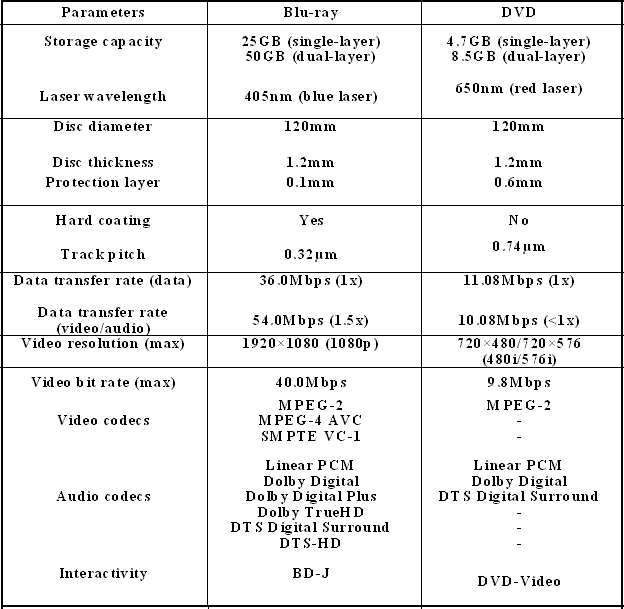
Blu-ray is the advanced storage technology, which helps to store a huge amount of data in a disc than all the present storage disc technologies. In the present DVD’s we can store just upto 25GB and with this Blu-ray technology, the storing capacity raises to 50GB to 500GB capacity. The advancement is that the Blu-ray uses the optical disc technology to store the data in which the datas can be stored for a long period of time than the present DVD’s and CD’s. With the same dimensions of the present CD’s and DVD’s, the Blu-ray discs(BD) are slowly getting through the market value.


How came the name Blu-ray?

The standard CD’s uses the wavelength of infrared rays to read or write any data (780nm). The DVD’s uses the wavelength shorter than the infra red rays, around 650nm to read or write any data. But, as the Blu-ray discs use the wavelength more shorter and sharper than this, nearly 405nm wavelength, which is the wavelength of the blue violet-laser light, the discs are called as Blu-ray discs. The Blu-ray discs emerged from the word Blue-ray. Shorter the wavelength, higher will be the reading/writing speed and larger will be the disc storage capacity. So, the Blu-ray discs allow nearly five times a larger storage capacity to that of a normal DVD. At present, Blu-ray discs have a maximum, dual-layer storage capacity of 50GB.


With more than five to six times greater storage, the discs can be stored with the longer movies with the wonderful clarity and good resolution. The storage problems of the long time videos comes to an end. Another one advantage of these disks are that they comes with a hard coating layer, which are almost vulnerable to scratches.
Blu-ray developer-Blu-ray Disc Association (BDA)

The Blu-ray was developed by the Blu-ray Disc Association (BDA) which is currently signed in link with than 200 of the leading consumer electronics, personal computer, and media manufacturers that include, Pioneer Sharp, Apple, Dell, HP, Thomson Multimedia, Walt Disney Pictures, Warner Bros. Entertainment, Sony and Samsung.


Comparison between DVD and Blu-ray Disc

In early 1980’s the floppy discs were the great storage mediums, which were slowly replaced by the CD’s in late 1990’s. The CD’s too started to loose its values with the replacement by DVD’s in 2000. The Blu-ray discs with its improved storage capacity will surely replace all the existing DVD’s says a technological report.


Types of Blu-ray discs

a)Mini Blu-ray Disc

The Mini Blu-ray Disc (also, Mini-BD and Mini Blu-ray) is a compact 8 cm (~3in)-diameter which is a variant of the Blu-ray Disc.It can store approximately 7.5 GB of data. It is similar to the MiniDVD and MiniCD. Recordable (BD-R) and rewritable (BD-RE) versions of Mini Blu-ray Disc are also available.

b)Recordable Blu-ray Disc

BD-R discs can be written to once, whereas BD-RE can be erased and re-recorded multiple times. It is also similar to read/write CD’s and DVD’s.

Blu-ray Players

There are variety of Blu-ray players which are designed by many companies like SONY, SAMSUNG,SHARP and so. These players also have the in-built option to play all the CD and DVD disks too.The technological advancements are being under innovation to make these players more developed. Let us wait for them...

Source :Internet

Thursday, April 8, 2010

Famous Technology Products Got Their Names

iPod:Open the pod bay door, Hal

During Apple's MP3 player development, Steve Jobs spoke of Apple's strategy: the Mac as a hub to other gadgets. Vinnie Chieco, a freelance copywriter Apple hired to help name the gadget before its debut in 2001, fixed on that idea, according to Wired. He brainstormed hubs of all kinds, eventually coming to the concept of a spaceship. You could leave it, but you'd have to return to refuel. The stark plastic front of the prototype inspired the final connection: pod, a la 2001. Add an "i" and the connection to the iMac was complete.

BlackBerry: Sweet Addictiveness

Canada's Research in Motion called on Lexicon Branding to help name its new wireless e-mail device in 2001. The consultancy pushed RIM founders away from the word "e-mail," which research shows can raise blood pressure. Instead, they looked for a name that would evoke joy and somehow give feelings of peace. After someone made the connection that the small buttons on the device resembled a bunch of seeds, Lexicon's team explored names like strawberry, melon and various vegetables before settling on blackberry - a word both pleasing and which evoked the black color of the device.

Firefox: Second Time's a Charm

Choosing a name that evokes a product's essence and is available can be quite complicated, as the Mozilla folks found out. The early version of Mozilla's browser was called Firebird, but due to another open-source project with the same name, the Mozilla elders renamed their browser Firefox, which is another name for red panda. Why? "It's easy to remember. It sounds good. It's unique. We like it," they said. Best of all? Nobody else was using it.

Twitter: Connecting the Digital Flock 140 Characters at a Time

When cofounder Biz Stone saw the application that Jack Dorsey created in 2006 he was reminded of the way birds communicate: "Short bursts of information...Everyone is chirping, having a good time." In response, Stone came up with "twttr," and the group eventually added some vowels. It's hard to think of a more evocative name in the tech world than twitter, but what began as what Stone described as "trivial" bursts of communication developed into a powerful means of networking, breaking news, and forum for the 44th U.S. president's campaign

Windows 7: Counting on the Power of 7

While Microsoft's next OS is kind of a "Ho-hum" name, one has only to look at what happened with the most recent Windows release to understand why Microsoft might have gone back to a tried-and-true naming philosophy: Vista? Ouch. Windows 95 and XP? Those have done much better. Microsoft's Mike Nash announced the name this way: "Simply put, this is the seventh release of Windows, so therefore 'Windows 7' just makes sense." We're betting that Microsoft execs are hoping that number 7 will deliver on its promise of luck—they could sure use a win after Vista.

ThinkPad: Simplicity Wins Out

The venerable line of PC notebooks rolled onto the scene in 1992. While the concept was spot on, there was turmoil at IBM as to what to call it. IBM's pen-computing group wanted to keep it simple; they liked ThinkPad. But IBM's corporate naming committee didn't - it didn't have a number, and every IBM product had to have a number, and how would ThinkPad translate into other languages? Due to the chutzpah of the IBMer who unveiled it, ThinkPad won out, and it was a huge hit for IBM, which eventually sold it to Lenovo in 2005.

Android: Secretive, But Still Not Exciting

You'd think the story behind the naming of the Open Handset Alliance's new open-source platform for mobile devices, which includes the brand-new G1 loaded with Google's goodies, would be cool. But, uh, not so much. Back in 2005, Google quietly acquired a mysterious startup named Android Inc., which had been operating under "a cloak of secrecy" on "making software for mobile phones," reported Businessweek. The result of all Google's secrecy and Internet hype was the debut of T-Mobile's G1 on Oct. 22, 2008.

Wikipedia: Just What It Sounds Like
 According to Wikipedia, the name Wikipedia is a portmanteau of wiki (a technology for creating collaborative websites) and encyclopedia (you remember, those large books that, as kids, we ruthlessly plagiarized for school book reports). FYI: a portmanteau is a fancy way of saying that we're going to take two words, jam them together and (hopefully) create a new concept that people will love. So far, so good. In an illustration of the axiom "the more things change the more they stay the same": Today, kids and adults now ruthlessly plagiarize Wikipedia instead of encyclopedias.

Mac OS X and "The Big Cats": Catlike Sleekness and Style

Apple's popular Mac operating system X actually denotes the Roman numeral 10, since it is the OS's tenth release, following Mac OS 9. To the ire of Apple fanboys, many people do refer to it as letter 'X.' More interesting have been the "big cat" code names assigned to each succeeding X release that have stuck with Apple's marketing: Cheetah (10.0), Puma, Jaguar, Panther, Tiger and current kitty Leopard. Snow Leopard has been assigned for the 10.6 release, with rumors that Lynx and Cougar are in the works.

Red Hat Linux: A Name Rich with Meaning

Cofounder Bob Young has given multidimensional origins of the red fedora name:

1. It was named after red, which in Western history is "the symbol of liberation and challenge of authority." 2. Cofounder Marc Ewing wore his grandfather's red Cornell lacrosse hat in college and became known for this tech expertise - those with problems went to see the guy in the red hat. 3. Ewing named his software projects Red Hat 1, Red Hat 2 and so on. "So, when he started his Linux project, he just named it Red Hat Linux," Young said. All righty then!

Source : Internet